Free
No licence key. No trial timer. No feature gating. No account.
Every feature works the moment you download it. If it saves you an afternoon of clicking through Security tabs, you're welcome to
buy me a coffee ☕ — that's the whole business model, and nothing in the app changes whether you do or not.
Stop Wrestling with icacls and PowerShell
NTFS Folder Audit gives you a fast, readable view of who has access to what across any Windows file share. Scan a local path or a UNC share, expand the folder tree, click any folder to see exactly who has access and where it came from, and hand your client a self-contained interactive HTML report — no PowerShell required.
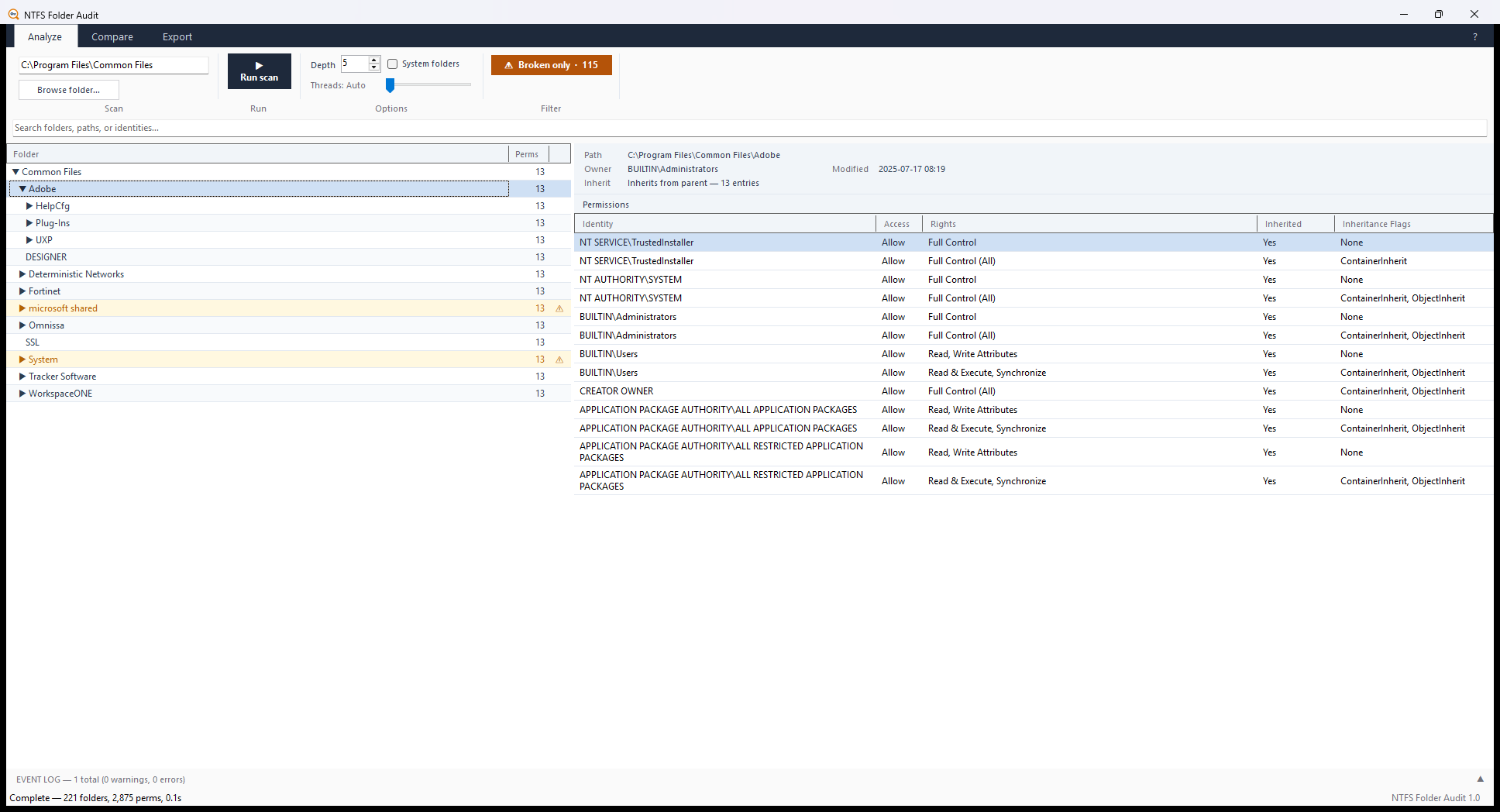
The permissions grid — identity, access type, decoded rights, and inheritance state at a glance.
See what it produces, before downloading anything:
Example scan report
·
Example comparison report
Genuine output from a sample file server — four folders with broken
inheritance, an over-permissive share, and a Deny rule. Search it, expand
the tree, open the permission panels. That is what a scan hands you.
🔒 It Never Phones Home
No telemetry. No analytics. No HTTP client anywhere in the source. It reads the filesystem and writes the report you asked for — that's all. Drop it on an isolated or air-gapped network and it behaves identically. The only URLs in the whole app are three links in the About dialog that open in your browser when you click them.
✓ Safe to run on a client's file server
No network connections, no data leaves the machine, no account, no watermarks on reports. What you scan stays with you.
🔧 What It Does
Permissions Grid
Scan any local path or UNC share to a depth you choose. Every folder shows identity, access type, decoded rights, inheritance state and flags.
Broken Inheritance Detection
Instantly flag folders whose ACLs are set explicitly instead of inherited — the first thing worth reviewing in any audit. One click filters the tree to only those folders.
Ownership & Orphaned SIDs
See the owner account per folder — including unresolvable SIDs left behind by deleted accounts, so nothing hides.
Side-by-Side Comparison
Point it at a share and its backup, or two folders that should match, and it highlights every folder whose permissions differ — plus anything present on only one side. See a live example →
Interactive HTML & CSV Export
A self-contained HTML report — searchable, expandable, no external dependencies — you can email to anyone. Or a flat CSV for a spreadsheet or ticketing system. See a live example →
Access-Denied Event Log
Folders your account can't read are surfaced in an event log rather than silently reported as empty — so you always know what you missed.
Command-Line / Headless
The same engine runs from the CLI for scheduled audits: --path, --output, --csv, --depth, --exclude-system, --open.
No Installation
A single self-contained EXE with the .NET runtime bundled in. Copy it to a tools folder, a server, or a USB stick and run — nothing touches Program Files.
How to Audit NTFS Folder Permissions
Auditing NTFS permissions means answering three questions for every folder on a share: who has access, what level of access they have, and where it comes from — inherited from a parent, or set explicitly on that folder. Here's the manual way, and the fast way.
The manual way — Security tab, icacls, or PowerShell
For a single folder, right-click it → Properties → Security → Advanced. That shows the access control list (ACL), the owner, and whether inheritance is enabled. Fine for one folder — tedious across a whole share.
From a command prompt, icacls dumps the ACL for a folder or a whole tree:
:: One folder
icacls "D:\Shares\Finance"

:: The whole tree, to a file
icacls "D:\Shares\Finance" /T > acl-report.txt
Or PowerShell with Get-Acl:
Get-ChildItem "D:\Shares\Finance" -Recurse -Directory |
  Get-Acl | Select-Object Path, Owner,
    @{ n='Access'; e={ $_.AccessToString } }
Both work — but on a real file server you're now reading raw ACE text, resolving SIDs by hand, and there's no quick way to spot which folders broke inheritance or to hand a client something readable. That's the gap this tool closes.
The fast way — one scan
NTFS Folder Audit performs the same audit in a single pass:
- Point it at a local path or UNC share and choose a scan depth.
- It builds a permissions grid — identity, access type, decoded rights, and inheritance state for every folder.
- One click filters the tree to only broken-inheritance folders — the first thing worth reviewing in any audit.
- It surfaces ownership and orphaned SIDs left behind by deleted accounts.
- Export a self-contained interactive HTML report (or CSV) to hand to the client or attach to a ticket.
No PowerShell, no manual SID lookups, no folder-by-folder clicking. Download it free and scan a share in about a minute →
⬇️ Download & Run
Easiest — install from the Windows Package Manager. It's built into Windows 10 and 11, so this is one line in any terminal:
winget install ProDirt.NTFSFolderAudit
That installs it as a portable command, so you can then run ntfsfolderaudit from any terminal. It also downloads outside the browser, which avoids the SmartScreen prompt described below.
Or download it directly. Grab the latest NTFSFolderAudit.exe from GitHub Releases. There's no installer — copy it and run.
Run it as Administrator. It works without elevation, but any folder whose ACL your account can't read comes back as access-denied (surfaced in the event log, never silently skipped).
The download is ~155 MB because the .NET runtime is bundled inside — the trade for "copy it to any server and it just runs."
⚠️ "Windows protected your PC"? That's expected.
The EXE isn't code-signed with an (expensive) EV certificate, so the first time you run it Windows SmartScreen may show a blue "Windows protected your PC" screen. That's SmartScreen not recognising a new, unsigned app yet — not a virus detection. Click More info → Run anyway. The warning fades once enough people have run the release.
Don't take my word that it's clean. Here's the independent VirusTotal scan of the release EXE → — 70+ antivirus engines, verify it yourself.
👤 Who It's For
MSP Technicians
Audit a client file server fast — drop the EXE on the box, scan, export a report, done. Free to use in paid client work.
IT Admins
Document permissions before a migration and catch broken inheritance before it becomes a support ticket.
Sysadmins
Compare permissions across a share and its backup to verify a migration landed correctly — instant diff.
Compliance & Audit
Produce readable permission reports for reviews without writing a line of PowerShell.
📋 Requirements
- Operating System Windows 10, Windows 11, Windows Server 2016 or newer
- Architecture x64
- Installation None — single self-contained EXE (~155 MB), or
winget install ProDirt.NTFSFolderAudit
- .NET Runtime Bundled — no separate install needed
- Privileges Run as Administrator for full ACL access
- Network None — the tool makes no network connections at all
📜 Licence
PolyForm Shield 1.0.0 — free to use, not free to resell. In plain terms:
- ✓ Yes — use it at work, on client systems, in paid engagements
- ✓ Yes — share it, mirror it, hand the EXE to a colleague
- ✓ Yes — read the source, modify it for your own use
- ✗ No — sell it, charge for access, or ship it inside a product you sell
Note: this is a source-available licence, not an OSI open-source one — GitHub lists it as "Other." Using it to deliver IT work to your clients is exactly what it's for; the noncompete only covers selling the software itself.
NTFS Permissions Auditing — FAQ
How do I audit NTFS folder permissions?
Scan the folder or share, then for every folder check who has access, their access level, and whether it's inherited or set explicitly — paying special attention to broken inheritance and unresolved (orphaned) SIDs. You can do it by hand with the Security tab, icacls, or PowerShell's Get-Acl (see the walkthrough above), or run NTFS Folder Audit to do the whole share in one scan and export a report.
How can I see who has access to a shared folder or UNC path?
Point the tool at the UNC path (e.g. \\server\share) and scan. The permissions grid lists every identity with access to each folder, the rights they hold, and where those rights came from — no need to open the Security tab folder by folder.
What is broken NTFS inheritance, and why does it matter?
A folder has "broken" inheritance when someone disabled inheritance and set permissions directly on it, so it no longer follows its parent. It's the usual source of "why can this person still see this folder?" surprises, so it's the first thing to review in an audit. The tool flags every broken-inheritance folder and can filter the tree to show only those.
Do I need administrator rights to audit permissions?
No — it runs without elevation. But run it as Administrator to read every folder's ACL; any folder your account can't read is listed in an access-denied event log rather than silently skipped, so you always know what you missed.
Can I export an NTFS permissions report to HTML or CSV?
Yes. It exports a self-contained interactive HTML report — searchable, expandable, no external dependencies — that you can email to a client, or a flat CSV for a spreadsheet or ticketing system. See the example report.
Is it safe to run on a client's file server?
Yes. It makes no network connections — no telemetry, no analytics, no data leaves the machine. It reads the filesystem and writes the report you asked for. Drop it on an isolated or air-gapped network and it behaves identically.
Is there a free NTFS permissions reporter / auditor?
This is one. NTFS Folder Audit is free — no licence key, no trial timer, no feature gating. If you've used paid permission-reporting tools before, this covers the core audit — scan, flag broken inheritance, compare two paths, and export a report — at no cost, and it's free to use in paid client work.
How is this different from icacls or PowerShell Get-Acl?
Same underlying data, far less work. Instead of raw ACE text and manual SID resolution, you get a readable grid with decoded rights and inheritance state, one-click broken-inheritance filtering, orphaned-SID detection, side-by-side comparison of two paths, and a client-ready report — without writing or maintaining a script.